Translate

Showing posts with label ADC. Show all posts

Sunday, January 24, 2016

Studio Display Mod - Assembled

Despite the revolution of LCD technology bring about production of HD monitors with 4K or even 5K resolutions, some people still concern not only the screen quality per se but also the overall design of a monitor (like me XD). This is one of the articles about modifying an obseleted Apple Studio Display 17" (ADC) to meet present use.
There are at least 2 ways to modify the Studio Display: the easier way is to migrate the original LCD circuit board into the studio display. But I dislike this idea not only because there will be 2 lines out (the power cord and the DVI/VGA cord), but also this sacrifices the functions of USB at the right side of the monitor.

Therefore, I adapted another way: cobined the signal, the USB and the power cords into one ADC cord. Then there will be one ADC line out. It would be terrific! However, this associates more scoldering work and higher cost as I need to buy an ADC to DVI adapter for the monitor.


Assemble of the Apple Studio Display (17" ADC)

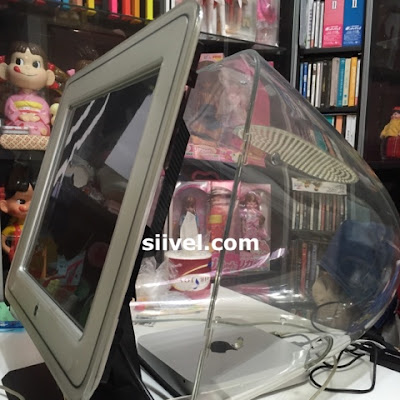
After completing the "dummy" CRT and installation of circuit board therein, I re-attached the mount assembly with it, by placing the edge of the stand tilt base in the bezel channel, as shown in pic 1.

Next, install the video assembly to the neck of the "dummy  CRT" and fasten the nect clamp with a screwdriver (pic 2).

Then returned the video can in its original position (pic 3).

Afterwards, re-install theCRT shroud with screws (pic 4).

Saturday, January 9, 2016

Studio Display Mod - Blueprint of Protective Skin

Despite the revolution of LCD technology bring about production of HD monitors with 4K or even 5K resolutions, some people still concern not only the screen quality per se but also the overall design of a monitor (like me XD). This is one of the articles about modifying an obseleted Apple Studio Display 17" (ADC) to meet present use.
Those are blueprints of protective skin of Apple Studio 17" (CRT) Display (ADC):

Protective Skin for Apple Studio Display

Protective Skin for Apple Studio Display

Protective Skin for Apple Studio Display

Protective Skin for Apple Studio Display

Protective Skin for Apple Studio Display

Sunday, December 6, 2015

Studio Display Mod - What is "Apple Studio Display"?

Despite the revolution of LCD technology bring about production of HD monitors with 4K or even 5K resolutions, some people still concern not only the screen quality per se but also the overall design of a monitor (like me XD). This is one of the articles about modifying an obseleted Apple Studio Display 17" (ADC) to meet present use.
From 1998 to 2003, Apple Manufactured a series of displays bearing the name of "Studio Display". Unlike "iMac", "iBook" or "Power Mac" which have more or less similar outlook in their respective generations, the Studio Display however could be a LCD, CRT; could have DB-15, VGA, DVI or ADC connections. It appears that one couldn't establish a standard in the outlook and specs of those Studio Displays.


Apple Studio Display
Various Studio Displays being Manufactured by Apple
Note:
(1) Apple Studio Display 15" (Mar 1998) in Transparent Dark Blue Colour. It had a DB-15, 2 ADB ports, a S-video and Composite video port.

(2) Apple Studio Display 15" (Aug 1999) in Transparent graphite and white. In DVI connection.

(3) Apple Studio Display 15" (Jan 1999) in Transparent blueberry and white. In VGA connection.

(4) Apple Studio Display in Transparent blueberry and white in Jan 1999 (17" & 21" CRT). VGA connection only.

(5) Apple Studio Display in Transparent graphite and white in Aug 1999 (17" & 21" CRT). VGA Connection only.

(6) Apple Studio Display 15" (July 2000), 17" (Mar 2001) and 20" (Jan 2003 designate as "Cinema Display). Only in ADC connection.

(7) Apple Studio 17" CRT Display (ADC) in clear acrylic shell (July 2000). ADC only.

(8) A Studio Display 17" with the Power Mac G4 Tower.


Saturday, December 5, 2015

Studio Display Mod - About ADC Connection

Despite the revolution of LCD technology bring about production of HD monitors with 4K or even 5K resolutions, some people still concern not only the screen quality per se but also the overall design of a monitor (like me XD). This is one of the articles about modifying an obseleted Apple Studio Display 17" (ADC) to meet present use.
Using ADC (Apple Display Connector) is one of the distinguishing features of the Studio Displays debuted by Apple during 2000-2003.


Apple Display Connector


The ADC combines analog and digital video signals, USB, and power all in one cable. Users only need to plug that one and only one cable exert from an ADC monitor to the Mac which has an ADC connection, and it will provide power and signals required for the display connected.

Apple Studio 17 CRT Display (ADC) was the last CRT display issued by Apple, it has also an ADC connection. Unlike other CRT displays of its time, ADC is the only cable out for this monitor.


ADC Cable of Apple Studio 17 CRT Display (ADC)
The ADC Cable will be preserve in my mod work


Some people complain about the lack of compatibility of the ADC connector. When a device which has DVI only, one need to buy an DVI to ADC adapter for his/her ADC-only monitor. The adapter itself was not cheap, about US$149 at that time. Even if one has this adapter, s/he will find it incompatible with Apple Studio 17 CRT Display (ADC).

I personally, however, adore this connector as I dislike too much cables on the table.  The idea which combines all proprietaries into one cable is really terrific cos I don't need to care about all complex connections; also, I Don't need to find power cord/VGA/DVI/Display port for my monitor.

For the upcoming modification work, I am planning to preserve this ADC cable for the Studio Display. I don't want to make several holes for a power cord, a Display Port, a VGA/DVI, that is stupid. At the same time, I will made an adapter so that it will be able to connect with the latest Macs like Intel Mac Minis.
Modder | Producer | Blogger | Youtuber
Email: siiveldotcom@gmail.com

Thursday, November 26, 2015

Studio Display Mod - Take Apart the CRT

Despite the revolution of LCD technology bring about production of HD monitors with 4K or even 5K resolutions, some people still concern not only the screen quality per se but also the overall design of a monitor (like me XD). This is one of the articles about modifying an obseleted Apple Studio Display 17" (ADC) to meet present use.
Here's a Service Source of the Apple Studio 17 Display (ADC). After reading that, you will be able to disassemble your Studio Display:

http://tim.id.au/laptops/apple/displays/studio17adc.pdf

After disassembled the Display, you will have the following stuffs:

(a) the Outer Case - comprising of the front bezel, the rear housing and the stand;
(b) the deflection board; and
(c) the CRT.

Among these, the CRT is our subject matter which needs to be replaced by a LCD.

However, the CRT has leaded glass and poisoning substances inside. So when you take apart of it you need to pay special attention. Remember not to break the glass or you might be exposed to those poisoning substances therein. After take apart the CRT, hand over to e-scarp porofessionals for handling. 

After disassemble the display, I applied glue between the front bezel and a 16" LCD.

Modifying Apple Studio CDT Display (ADC)
Mac OSX Yosemite Shown Up in Apple Studio CRT Display (ADC)

Is that a good idea to modify the display this way?


Modifying Apple Studio CDT Display (ADC)
The CRT was being replaced by a 16" LCD Panel

I think it is amazing to see an Apple Studio CRT Display (ADC) works with a Mac Mini.

It is just the beginning. Please stay tuned to this blog:)

Wednesday, November 25, 2015

Studio Display Mod - An Idea

Despite the revolution of LCD technology bring about production of HD monitors with 4K or even 5K resolutions, some people still concern not only the screen quality per se but also the overall design of a monitor (like me XD). This is one of the articles about modifying an obseleted Apple Studio Display 17" (ADC) to meet present use.
In the early 2000s, Apple manufactured several displays bearing the name as "Studio Display". The Studio Didplay I am referring to, in this article, is the "Apple Studio Display 17 (ADC)", which was introduced by Apple in July 2000 and terminated in May 2001.


Apple Studio CRT Display (ADC)
Apple Studio Display 17 (ADC)


This Apple display is a "D-shaped" monitor with a Diamondtron CRT installed. It has a viewable area of 16”.  Its  connection via an ADC connector meant it could be used with a Power Mac G4 and a Power Mac G4 Cube only.

It is a beautiful monitor with a clear acryl-plastic housing.  The display adapted the Apple Display Connector (ADC) technology which was a new technology at that time which accepts power and signal simultaneously.

It is one of the Masterpieces of Apple. Yet, due to its limited compatibility with merely Power Mac G4 and the G4 Cube, it became obsolete quickly.

Some people had some creative idea changing it into a hamster home. I however thinking if I could make it compatible with the latest Mac. For example, replace the CRT by an LCD, using the mini display port as the connector. Have you got other ideas in modifying this?


Modder | Producer | Blogger | Youtuber
Email: siiveldotcom@gmail.com

Saturday, November 7, 2015

(Got It!) The Stand for 17" Apple Studio (CRT) Display

This May, I bought a vintage Apple Studio  (CRT) display with a damaged stand.

http://siiveldotcom.blogspot.com/2015/03/wanted-stand-for-17-apple-studio-crt.html

This Apple Studio (CRT) Display is a classical fantastic collector item. It is difficult to imagine that one will smash it and give me the stand. Nevertheless, I keep searching at ebay and some auction sites.


Apple Studio 17" ADC (CRT) Display
The Ad of the Apple Studio Display

Eventually I come across one with a junk one. It has cracks at the front panel. Moreover, there were scratches over the screen. The seller asked for about US$12 for this junk monitor. 


Apple Studio 17" ADC (CRT) Display
The Screen is Full of Scratches.


Apple Studio 17" ADC (CRT) Display
Cracks Around the Apple Logo.


Apple Studio 17" ADC (CRT) Display
The Pic is Blurred, I am Not Sure if there were a Crack at its Back.

This monitor is heavy. After considering the possible huge shipping cost, I asked the seller if he could send the stand to me. He agreed and the deal was reached. Shipping cost for this is about US$25.

After some days, the stand arrived in a strong box.


Apple Studio 17" ADC (CRT) Display
The Stand of Apple Display was being Packed in a Strong Box.

Apple Studio 17" ADC (CRT) Display
There is only Few Scratches on the Stand.

It is in good condition. I am glad that now I have a complete Studio Display in my collection.

Written by: Erik Siivel (@siivel.com)
Modder | Producer | Blogger | Youtuber 
Email: siiveldotcom@gmail.com

Tuesday, March 17, 2015

(Wanted) The Stand for 17" Apple Studio (CRT) Display

I have a 17" Apple Studio (CRT) Display in my collection.

17", ADC, Apple, Studio Display, CRT, siivel.com, Spare Part, Stand, Wanted

17", ADC, Apple, Studio Display, CRT, siivel.com, Spare Part, Stand, Wanted


Recently, I noted that a crack appeared at the stand of this monotor.

17", ADC, Apple, Studio Display, CRT, siivel.com, Spare Part, Stand, Wanted

I tried to find it at ebay but was in vain. Maybe it is already a very old product  so finding parts is difficult.

I would be grateful if anyone of you could offer assistance: if you have this spare part and want to sell it, please send the photo of you stand and your price at siiveldotcom@gmail.com.

Written by: Erik Siivel (@siivel.com)
Modder | Producer | Blogger | Youtuber 
Email: siiveldotcom@gmail.com