Translate

Showing posts with label iBook. Show all posts

Monday, April 18, 2016

Fixing Discolouration of iBook Clamshell

Last Article:

Discolouration is a very common phenomena for iBook G3 Clamshell. Yet it is quite unusual that there are almost no article mentions about this in google, not to mention any remedy solution.

In my last article, I shown an Indigo Clamshell with plenty of white marks scatter over the rubber parts. It is frustrating to see a vintage Mac which is still fully functional but has such a poor cosmetic condition. So I decided to find a way to fix it.

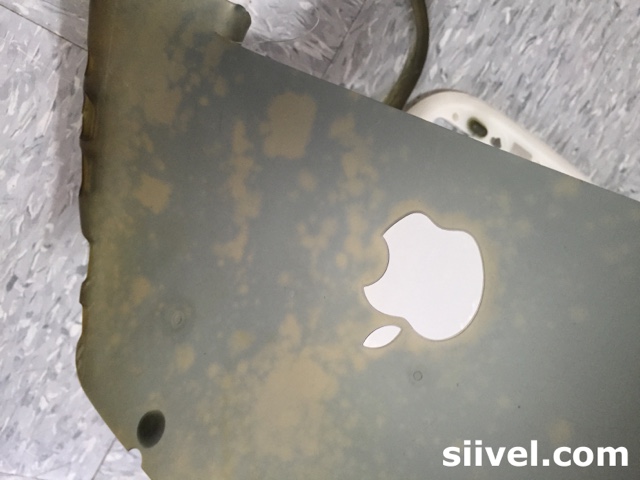
Discolouration of iBook Clamshell

I thought that painting, perhaps, the best solution. After several attempts, I found that the permanent ink by "Shiny" done the job satisfactorily.

Shiny Permanent ink to Fix iClam Discolouration
Shiny Blue Permanent Ink

Here were the photos taken after the paint work...
 iBook Clamshell After Repaint
iBook Clamshell After Repaint

 iBook Clamshell After Repaint
iBook Clamshell After Repaint

 iBook Clamshell After Repaint
iBook Clamshell After Repaint

 iBook Clamshell After Repaint
iBook Clamshell After Repaint

After the paint work, I applied a layer of protective film onto the shell. Wow, it is totally amazing, isn't it?


There is a video about the work:


Erik Siivel (@siivel.com)
Modder | Producer | Blogger | Youtuber
Email: siiveldotcom@gmail.com

Wednesday, February 17, 2016

iBook G3 Clamshell Mod - Install 1400x1050 Pixels HD LCD

This is one of the passages about the iBook G3 Clamshell modification project, of which a logicboard of Intel i5 was being installed into the classic Apple iBook G3 Laptop.

We start this project in 2014. We finished it in April 2015. A video about this project was uploaded onto Youtube. And I have been using it for almost a year.

Actually, I am very satisfied with its performance:

The i5 CPU is fast. The system is very quiet, stable and smooth, even if being upgraded to Mac OS X El Capitan.

Temperature of CPU is around 50 degree celsius all time.

The design of iBook Clamshell is the most elegant laptop ever. The idea of inclusion of a handle is great. I like carry the iBook with the handle. No pouch or cover is ever needed.

I applied a layer of protective film onto the shell. The skin protects the laptop and is still adhere firmly after a year. There is no need to buy any cover for it.

It is amazing to use a classic laptop like this, perform contemporary tasks effectively after 16 year of its first issue.

However, honestly speaking, there are some limitations to the modified iBook.

First, the screen resolution is limited to 1024 by 768 pixels. Which is a very low technology in these days.

Secondly, the battery life is about 3.5 to 4 hours after fully charged. I am not satisfied with this. I will try to find out if this is caused by too many application being used at the same time.

Recently, the iBook's LCD screen was replaced, by an aviation-graded 12" HD LCD with resolution 1400x1050 pixels.


Upgrade the LCD of iBook to 1400x1050
Upgrading the LCD of iBook Clamshell to 1400x1050


After the replacement, the System Preferences Window becomes smaller. Now the display can show more information; and it will be more meaningful to use the multi-tasking of Mac OS X El Capitan.


The resolution of 13" Macbook Air 2015
The Screen Resolutions of Macbook Air is 1440x900


In Apple's official site, it is declared that the resolutions of 13" MBA is 1440x900 whereas 11" is 1366x768. Now we have more pixels but in a smaller panel!

Erik Siivel (@siivel.com)
Modder | Producer | Blogger | Youtuber
Email: siiveldotcom@gmail.com


Wednesday, February 3, 2016

Tearing Off the Rubber Layering of iBook Clamshell

Thanks to a mixture of plastic and rubber casing, the iBook Clamshell is extra-ordinary tough against shocks. The rubber layering, however, is very easy to have marks appeared on it.


Tear Off the Rubber Layering of iBook Clamshell

What is the nature of those marks?

Today I tried to tear off this rubber layering from the iBook to check the nature of those marks: are they remain inside the rubber? Or between the rubber layer and the plastic shell? 

I have a damaged graphite case for this experiments.


Tear Off the Rubber Layering of iBook Clamshell

I started from a cut made by the cutter. And then I tore the plastic off with force.


Tear Off the Rubber Layering of iBook Clamshell

The plastic attached firmly with the plastic shell. Huge amount of force was used. It is therefore unlikely that those mark are dirts penetrated between the rubber layering and the plastic shell.

Tear Off the Rubber Layering of iBook Clamshell

There are 4 knots close to the battery door. It could not be tore off without the aid of a cutter.

Tear Off the Rubber Layering of iBook Clamshell

Finally, I took apart the rubber layer from the plastic case. The plastic shell is still remaining clean. I conclude that those are not dirt, instead, discolour which could not be eliminated by water, detergent or alcohol. 

Tear Off the Rubber Layering of iBook Clamshell

So, if your iBook Clam has marks appear.  Do not try to clean it because it could not help. It is better to have a replacement instead.

Erik Siivel (@siivel.com)
Modder | Producer | Blogger | Youtuber
Email: siiveldotcom@gmail.com

Saturday, January 30, 2016

Discolouration of iBook Clamshell

Yesterday I conducted annual check of the iBook clamshells I have collected.

What I have done for the check up:

(1) a physical inspection: checked their outlooks, took photos. Any oxidation? discolouration? any deterioration in physical condition, when comparing with the record last year?

(2) a hardware test: plug and power on the unit, check the LCD, keyboard, trackpad, back light, AC connection, battery and so on...

(3) protective measures: such as replacement of dessicant, rewarping and repacking the units...

(4) maintain proper record after implementation of those work.

IBook Clamshell Collection

iBook Clamshells with Original Boxes

I noted the one of the iBook, which is of indigo colour, has been seriously discoloured. I don't know why. I checked its photos which were being taken last year. Those discolouration didn't exist at all.

Discolouration of iBook Clamshell

Those discolouration concentrates at the rubber part of the iBook.

Discolouration of iBook Clamshell

The indigo colour has fated into white colour.

Discolouration of iBook Clamshell

Those discolouration scatter over that iBook.

Discolouration of iBook Clamshell

Luckly, other iBooks were not affected.

Discolouration of iBook Clamshell

I googled this syntom but in vain. It appears that no one has talk about this before.

It made me frustrated because I have no clue or idea to prevent it from happening again.

If you had any idea. Kindly share m(_ _)m I really appreciate that.

Erik Siivel (@siivel.com)
Modder | Producer | Blogger | Youtuber
Email: siiveldotcom@gmail.com

Tuesday, March 24, 2015

iBook Clamshell Mod - Keyboard and Trackpad Attached

This is one of the passages about the iBook G3 Clamshell modification project, of which a logicboard of Intel i5 was being installed into the classic Apple iBook G3 Laptop.
It is already the final stage of the iBook G3 Clamshell modification project. Yesterday, I attached the original Keyboard and Trackpad to the iBook Clamshell. Afterwards, I tested them thoroughly, by pressing the keys one by one. Also, I tried to use the combination keys such as reseting PRAM, all worked in order. Test results were satisfactory.

Apple, Clamshell, Core, G3, Haswell, i5, i7, iBook, Intel, Keyboard, Mac, Magic Trackpad, Mod, Modification, OSX, Trackpad, Upgrade, 改, 改造, 改造計画, Macintosh, 改造計劃, Siivel, siivel.com, クラムシェル, シェル,

It is however quite disappointed that the Cap Lock Button could not be lit. And as to the Trackpad, originally, I intended to install the Magic Trackpad into the iBook but subsequently in vain.

Nevertheless, it is already a successful mod, in terms of keeping the original outlook at the same time, retain the original functions of those peripherials.

Apple, Clamshell, Core, G3, Haswell, i5, i7, iBook, Intel, Keyboard, Mac, Magic Trackpad, Mod, Modification, OSX, Trackpad, Upgrade, 改, 改造, 改造計画, Macintosh, 改造計劃, Siivel, siivel.com, クラムシェル, シェル,


The "skin" if the Trackpad has been replaced by a new one (as the old one had been "polished" by repeated usage), and covered by the a layer of Bestskinsever. 

Sunday, January 11, 2015

iBook Clamshell Mod - What is iBook Clamshell?

This is one of the passages about the iBook G3 Clamshell modification project, of which a logicboard of Intel i5 was being installed into the classic Apple iBook G3 Laptop.
Apple, CD Rom, Clamshell, Ethernet, Firewire, G3, iBook, Modem, Optical Drive, PowerPC, Steve Jobs, USB, wireless networking, クラムシェル, シェル, 改, 改造, 改造計劃, 改造計画, siivel.com, Siivel,  

iBook G3 is a series of consumer portable laptop launched by Apple. It was first introduced by Steve Jobs during the keynote presentation of Macworld Conference & Expo in New York City on 21 June 1999.

The first generation iBook has a clam shell outlook, so it was called "iBook Clamshell" to distinguish from its succeeding models. Its body is translucent either in Tangerine (Orange) and Blueberry (Blue) colour. It has a PowerPC G3 CPU, USB, Ethernet, modem ports, an optical drive and designed with integrated wireless networking.

On February 16, 2000, Apple issued the iBook SE (Special Edition) which is in Graphite (grey) colour. 

On 13 Sept 2000, Apple issued the iBook (FireWire) which is in Indigo (Blue), Graphite and Key Lime (Green) colour.

On 1 May 2001, iBook Clamshell was discontinued and replaced by the next generation iBook G3 Dual USB in Snow colour.


Related Articles:


Thursday, December 18, 2014

iBook Clamshell Mod - Connecting the LCD Panel with the Main Body

This is one of the passages about the iBook G3 Clamshell modification project, of which a logicboard of Intel i5 was being installed into the classic Apple iBook G3 Laptop.
Instead of using a 800x600 resolution LCD panel, we replace it by a new one with 1024x768. It is because a 800x600 LCD couldn't show all contents of Mac OSX Yosemite.


1024x768, 800x600, Apple, Clamshell, G3, Haswell, iBook, Intel, Core i5, LCD, Macbook Air, Modification, Modify, Siivel, siivel.com, クラムシェル, シェル, 改, 改造, 改造計画, 改造計劃,

After we install the new LCD, we rearrange the wires as shown in the above picture. Then we attached the LCD with the main body of the iBook.

1024x768, 800x600, Apple, Haswell, iBook, Clamshell, G3, Modify, Modification, クラムシェル, シェル, Intel Core i5, LCD, Macbook Air, 改, 改造, 改造計画, siivel.com, Siivel,

Now, the LCD was connected to the body of iBook. And it was booting Mac OSX Yosemite.

We have a video about this iBook G3 booting Mac OSX Yosemite:

http://youtu.be/X1wdGIpPuk4

Thursday, November 27, 2014

iBook Clamshell Mod - Yo-Yo Adapter Modified

The adapter is very crucial for iBook modification because we need to power on the iBook to continue our work, or our work will merely stay in the theoretical level. Today, the adapter is done ! (^^)


This was the original outlook of the Apple adapter.

After we modified it and polished it, it becomes:

Apple, iBook, Clamshell, G3, iBook G3 i5, Modification, Modify, Yo-Yo Adapter, クラムシェル, シェル, 改, 改造, 改造計画, Siivel, siivel.com,

 (Actually no change in outlook, but has a change in output voltage from 24V to 14V ^^)

The below photo is showing the original outbook of the bottom of the adapter:

Apple, iBook, Clamshell, G3, iBook G3 i5, Modification, Modify, Yo-Yo Adapter, クラムシェル, シェル, 改, 改造, 改造計画, Siivel, siivel.com,

After modification, it becomes:

Apple, iBook, Clamshell, G3, iBook G3 i5, Modification, Modify, Yo-Yo Adapter, クラムシェル, シェル, 改, 改造, 改造計画, Siivel, siivel.com,

 (Also no change in outlook :-D)

However it seems unavoidable to have cracks on the shell of the adapter, like the pic below ... as it was crack-opened by us previously. So if anyone of you knows the way to open the Yo-Yo adapter beautifully, please tell us by mail.