Showing posts with label Mac. Show all posts
Showing posts with label Mac. Show all posts
Friday, November 13, 2015


Thursday, November 12, 2015
How to Pin Tab in Safari?
Pinned Tab is a new feature of Safari for Mac OSX El Capitan. For those sites which support Pinned Tab, after one pins the site, a small icon will be shown up at Pinned Tab, otherwise, the first letter will be chosen in lieu of an icon.
Adding a site to Pinned Tab is simple:
(1) Open the site you want to add into the Pin Tab, in my example, Apple.com.

(2) Place the pointer on the site tab and right-click (Control+Click), a box "Pin Tab" will appear.

(3) Choose "Pin Tab" and the Site's pin icon will be added into the Pinned Tab.


(2) Place the pointer on the site tab and right-click (Control+Click), a box "Pin Tab" will appear.

(3) Choose "Pin Tab" and the Site's pin icon will be added into the Pinned Tab.

Isn't that easy?
Erik Siivel (@siivel.com)
Modder | Producer | Blogger | Youtuber
Email: siiveldotcom@gmail.com
Tuesday, March 24, 2015
iBook Clamshell Mod - Keyboard and Trackpad Attached
This is one of the passages about the iBook G3 Clamshell modification project, of which a logicboard of Intel i5 was being installed into the classic Apple iBook G3 Laptop.
It is already the final stage of the iBook G3 Clamshell modification project. Yesterday, I attached the original Keyboard and Trackpad to the iBook Clamshell. Afterwards, I tested them thoroughly, by pressing the keys one by one. Also, I tried to use the combination keys such as reseting PRAM, all worked in order. Test results were satisfactory.
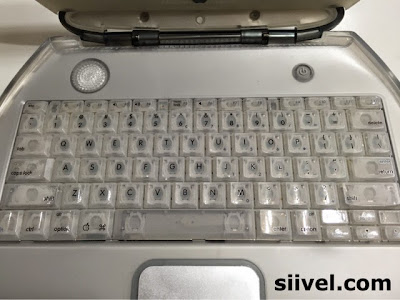

iBook Clamshell Mod - Keyboard and Trackpad Attached
It is already the final stage of the iBook G3 Clamshell modification project. Yesterday, I attached the original Keyboard and Trackpad to the iBook Clamshell. Afterwards, I tested them thoroughly, by pressing the keys one by one. Also, I tried to use the combination keys such as reseting PRAM, all worked in order. Test results were satisfactory.

It is however quite disappointed that the Cap Lock Button could not be lit. And as to the Trackpad, originally, I intended to install the Magic Trackpad into the iBook but subsequently in vain.
Nevertheless, it is already a successful mod, in terms of keeping the original outlook at the same time, retain the original functions of those peripherials.

The "skin" if the Trackpad has been replaced by a new one (as the old one had been "polished" by repeated usage), and covered by the a layer of Bestskinsever.
Related Articles:
Written by: Erik Siivel (@siivel.com)
Modder | Producer | Blogger | Youtuber
Email: siiveldotcom@gmail.com
Tuesday, October 21, 2014
Mac Mini 2014 has a Decreased Multi-core Performance...
http://www.macrumors.com/2014/10/19/mac-mini-2014-benchmark/
That is sad :(
That is sad :(
Written by: Erik Siivel (@siivel.com)
Modder | Producer | Blogger | Youtuber
Email: siiveldotcom@gmail.com
Friday, October 10, 2014
Mac OSX Yosemite Installed in iMac G3 i7
 |
| It is just the Beta Version :) |
Mac OSX Yosemite will come this fall.
However, Mac users are invited to participate in Apple's OSX Beta Program and try the Beta Version of Mac OSX Yosemite before it launches:
https://appleseed.apple.com/sp/betaprogram/
I have partitioned my hard disk and installed the Mac OSX Yosemite (Beta) into my iMac G3 i7. This is the video about the process of installation and review:
http://youtu.be/U2wRn4d5HJE
I will conduct more tests to see its performance and limitations when use with iMac G3 i7.
Written by: Erik Siivel (@siivel.com)
Modder | Producer | Blogger | Youtuber
Email: siiveldotcom@gmail.com
Friday, June 27, 2014
The Evolution of iMacs
Since its first launch in 1998, the Apple iMac has undergone several generations. Different people have their own interpretation in classifying the iMac, in terms of general design (tear-shaped, sun-flower, flat panel), the processor inside (G3, G4 G5, Intel), or even model number (M4984, M5521).
I like to identify them in terms of design because it is the easiest way for a person to identify an iMac. When we look into the early generations of iMac, we found that their design is radical at their times: the original iMac is made by translucent plastic with a tear-shaped body; the iMac G4 is dome-shaped with a LCD panel erecting upon it; the iMac G5 has all of the components enclosed at the back the LCD.
How about those after iMac G5? It seem to me that Apple has made no headway: the designs are much alike with merely fine-tuning in material use, a wider screen, a thinner body, and faster CPUs. Is that really an evolution?
Really hope the next iMac will make me say WOW.
I like to identify them in terms of design because it is the easiest way for a person to identify an iMac. When we look into the early generations of iMac, we found that their design is radical at their times: the original iMac is made by translucent plastic with a tear-shaped body; the iMac G4 is dome-shaped with a LCD panel erecting upon it; the iMac G5 has all of the components enclosed at the back the LCD.
How about those after iMac G5? It seem to me that Apple has made no headway: the designs are much alike with merely fine-tuning in material use, a wider screen, a thinner body, and faster CPUs. Is that really an evolution?
Really hope the next iMac will make me say WOW.
 |
| The Evolution of iMacs |

Written by: Erik Siivel (@siivel.com)
Modder | Producer | Blogger | Youtuber
Email: siiveldotcom@gmail.com
Thursday, June 19, 2014
Why Mac Modification Project?
In many discussion forums, there are always
groups of people discussing the possibility of upgrading hardware of old Macs. People
are exploring the possibility to upgrade it with present specifications.
There is another group of people who is not
upgrading their Macs, rather, they are just collecting them.
I am both of them. On the one hand, I collect old Macs; on the other hand, I upgrade old Macs for myself and for others. To me, vintage Macintosh is so adorable that "playing" along with an operative old Mac is fantastic, however, I can't stand "working" with a Macintosh with a speed of MHz.
Also, many applications of vintage Macs cannot be used nowadays, for example, you cannot sync an iphone 5 with iTunes v2.0, you cannot watch Youtube with iBook Clamshell, some of the contents in the Internet are no longer readable with IE...
Written by: Erik Siivel (@siivel.com)
Modder | Producer | Blogger | Youtuber
Email: siiveldotcom@gmail.com
Subscribe to:
Posts (Atom)