Translate

Showing posts with label Mod. Show all posts

Sunday, December 20, 2015

Studio Display Mod - Protective Film for the Display

Despite the revolution of LCD technology bring about production of HD monitors with 4K or even 5K resolutions, some people still concern not only the screen quality per se but also the overall design of a monitor (like me XD). This is one of the articles about modifying an obseleted Apple Studio Display 17" (ADC) to meet present use.
The Studio Display is heavy. It is about 45.8 lb (21 kg). The whole weight of the display is being sustaied by the stand. To make it worst, as the monitor is already a very old item, there will be some depreciation, degrading or weakening of the structure, including the stand. Therefore, whether it is still fit to hold the CRT is in doubt. In fact, my original Studio Display has been broken at the stand.

After the modification, the display will be much lighter, as the CRT will be removed. However, it is still a good idea to strengthen the structure of the stand to prevent it from damage and extend its lifespan.

DIY Protective Skin for Apple Studio Display
Making a Protective Skin for the Stand


We have initiated a number of proposals, but finally, we found that applying Bestskinsever protective skin on the stand of the Studio Display appears to be the best solution.


DIY Protective Skin for Apple Studio Display
Finished! (Front View)

DIY Protective Skin for Apple Studio Display
Finished! (Rear View)

DIY Protective Skin for Apple Studio Display
The Bestskinsever Skins on the Display Stand is Hardly Noticed


The on scale blueprint will be uploaded in another passage, you may need it if you have this monitor, even if you don't mod it.

DIY Protective Skin for Apple Studio Display

Tuesday, December 8, 2015

Studio Display Mod - Polishing the Case

Despite the revolution of LCD technology bring about production of HD monitors with 4K or even 5K resolutions, some people still concern not only the screen quality per se but also the overall design of a monitor (like me XD). This is one of the articles about modifying an obseleted Apple Studio Display 17" (ADC) to meet present use.
Polishing the shell is one of the most important step of our current Studio Display modification project as our goal is to give a junk Mac a new life. "A new life" not only limited to the innards spec but also to the outlook.


Scratches on the Mac
There were Many Scratches over the Case of Studio Display


Used Macs always unavoidably have the surface scratched in varying degrees. By rubbing the case with liquid polish, we remove the scratches and creat a smooth and shiny surface.


Dents on the Mac
Dents on the Studio Display


For the Studio Display I am modifying, as it was originally an inoperative junk item, or perhaps a trash-picked item :), there are hundreds of scratches on the shell, some areas even have dents thus even polish is no use (sad). But we still try our best to renovate it.

We first use some Tamiya sand papers to rub the heavy scratch, then by liquid polish 3000 (particle size about 3 micrometres) followed by 9800 (particle size about 1 micrometre). Now most of the scratches has been removed.

Mac After Being Polished
Studio Display - After Being Polished

Saturday, December 5, 2015

Studio Display Mod - About ADC Connection

Despite the revolution of LCD technology bring about production of HD monitors with 4K or even 5K resolutions, some people still concern not only the screen quality per se but also the overall design of a monitor (like me XD). This is one of the articles about modifying an obseleted Apple Studio Display 17" (ADC) to meet present use.
Using ADC (Apple Display Connector) is one of the distinguishing features of the Studio Displays debuted by Apple during 2000-2003.


Apple Display Connector


The ADC combines analog and digital video signals, USB, and power all in one cable. Users only need to plug that one and only one cable exert from an ADC monitor to the Mac which has an ADC connection, and it will provide power and signals required for the display connected.

Apple Studio 17 CRT Display (ADC) was the last CRT display issued by Apple, it has also an ADC connection. Unlike other CRT displays of its time, ADC is the only cable out for this monitor.


ADC Cable of Apple Studio 17 CRT Display (ADC)
The ADC Cable will be preserve in my mod work


Some people complain about the lack of compatibility of the ADC connector. When a device which has DVI only, one need to buy an DVI to ADC adapter for his/her ADC-only monitor. The adapter itself was not cheap, about US$149 at that time. Even if one has this adapter, s/he will find it incompatible with Apple Studio 17 CRT Display (ADC).

I personally, however, adore this connector as I dislike too much cables on the table.  The idea which combines all proprietaries into one cable is really terrific cos I don't need to care about all complex connections; also, I Don't need to find power cord/VGA/DVI/Display port for my monitor.

For the upcoming modification work, I am planning to preserve this ADC cable for the Studio Display. I don't want to make several holes for a power cord, a Display Port, a VGA/DVI, that is stupid. At the same time, I will made an adapter so that it will be able to connect with the latest Macs like Intel Mac Minis.
Modder | Producer | Blogger | Youtuber
Email: siiveldotcom@gmail.com

Thursday, November 26, 2015

Studio Display Mod - Take Apart the CRT

Despite the revolution of LCD technology bring about production of HD monitors with 4K or even 5K resolutions, some people still concern not only the screen quality per se but also the overall design of a monitor (like me XD). This is one of the articles about modifying an obseleted Apple Studio Display 17" (ADC) to meet present use.
Here's a Service Source of the Apple Studio 17 Display (ADC). After reading that, you will be able to disassemble your Studio Display:

http://tim.id.au/laptops/apple/displays/studio17adc.pdf

After disassembled the Display, you will have the following stuffs:

(a) the Outer Case - comprising of the front bezel, the rear housing and the stand;
(b) the deflection board; and
(c) the CRT.

Among these, the CRT is our subject matter which needs to be replaced by a LCD.

However, the CRT has leaded glass and poisoning substances inside. So when you take apart of it you need to pay special attention. Remember not to break the glass or you might be exposed to those poisoning substances therein. After take apart the CRT, hand over to e-scarp porofessionals for handling. 

After disassemble the display, I applied glue between the front bezel and a 16" LCD.

Modifying Apple Studio CDT Display (ADC)
Mac OSX Yosemite Shown Up in Apple Studio CRT Display (ADC)

Is that a good idea to modify the display this way?


Modifying Apple Studio CDT Display (ADC)
The CRT was being replaced by a 16" LCD Panel

I think it is amazing to see an Apple Studio CRT Display (ADC) works with a Mac Mini.

It is just the beginning. Please stay tuned to this blog:)

Wednesday, November 25, 2015

Studio Display Mod - An Idea

Despite the revolution of LCD technology bring about production of HD monitors with 4K or even 5K resolutions, some people still concern not only the screen quality per se but also the overall design of a monitor (like me XD). This is one of the articles about modifying an obseleted Apple Studio Display 17" (ADC) to meet present use.
In the early 2000s, Apple manufactured several displays bearing the name as "Studio Display". The Studio Didplay I am referring to, in this article, is the "Apple Studio Display 17 (ADC)", which was introduced by Apple in July 2000 and terminated in May 2001.


Apple Studio CRT Display (ADC)
Apple Studio Display 17 (ADC)


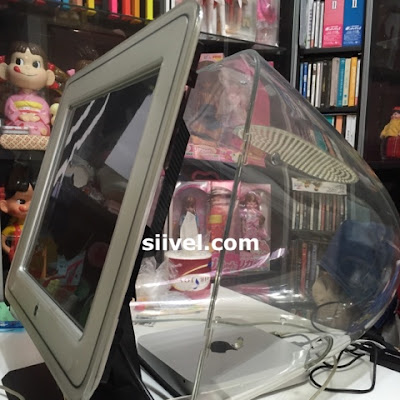
This Apple display is a "D-shaped" monitor with a Diamondtron CRT installed. It has a viewable area of 16”.  Its  connection via an ADC connector meant it could be used with a Power Mac G4 and a Power Mac G4 Cube only.

It is a beautiful monitor with a clear acryl-plastic housing.  The display adapted the Apple Display Connector (ADC) technology which was a new technology at that time which accepts power and signal simultaneously.

It is one of the Masterpieces of Apple. Yet, due to its limited compatibility with merely Power Mac G4 and the G4 Cube, it became obsolete quickly.

Some people had some creative idea changing it into a hamster home. I however thinking if I could make it compatible with the latest Mac. For example, replace the CRT by an LCD, using the mini display port as the connector. Have you got other ideas in modifying this?


Modder | Producer | Blogger | Youtuber
Email: siiveldotcom@gmail.com

Thursday, June 4, 2015

iMac G3 Mod - The Side Panel

Just finished making the Side Panel of iMac G3 i7 Version 2.0. Compare with the Version 1, this version has greater connectivity ability.

Apple, Core, G3, i5, i7, iMac, Intel, Mod, Modification, Modify, Project, Upgrade, siivel, siivel.com, Side Panel, USB 3.0, Thunderbolt, FireWire, Mic Jet, 3.5mm Stereo, Gigabite Ethernet, 改, 改造, 改造計劃, 改造計画
(1) Mic Jet;
(2) 3.5mm Stereo Jet;
(3) Firewire Port (could be changed to USB 3.0);
(4) and (6) USB 3.0;
(5) a Thunderbolt Cord; and
(6) Gigabite Ethernet.

Mic and speaker jets are new features of Version 2.

If you still have vintage devices like iSight Camera, iPod Gen 1-3 ..., you still need a FireWire Port, or just dropped it.

As there is no "female" Thunderbolt Port available in the market (unless being disassembled from a Thunderbolt device), the Thunderbolt Jet has no choice but to be built this way.

Related Articles:

iMac G3 Mod - What is iMac G3?
iMac G3 Mod - iMac G3 "i7": an iMac G3 with i7 CPU


Written by: Erik Siivel (@siivel.com)
Modder | Producer | Blogger | Youtuber 
Email: siiveldotcom@gmail.com


Sunday, October 12, 2014

iBook G3 Clamshell Intel Core i5 Mod - Is it Possible?

This is one of the passages about the iBook G3 Clamshell modification project, of which a logicboard of Intel i5 was being installed into the classic Apple iBook G3 Laptop.

Apple, Clamshell, Core, G3, i5, i7, iBook, Intel, Laptop, lithium battery, Macbook Air, Macintosh, Mod, Modification, クラムシェル, シェル, 改, 改造, 改造計劃, 改造計画,
The Blueberry, Graphite and Tangerine iBook G3 Clamshell


The iBook G3 Clamshell was issued in July 1999 and discontinued in May 2001. It was a product for more than a decade. However, as time goes by, we find that its design is still very cool and elegant.

Is iBook G3 Clamshell obsolete?

The iBook G3 Clamshell had been classified as "obsolete" or "vintage" because it is no longer supported by Apple in terms of software upgrade or hardware repairation. Apple won't fix a broken iBook even one is willing to pay. However, if your iBook G3 Clamshell runs out-of-order, you can still find parts from ebay for self replacement.

Ironically, the iBook G3 Clamshell is quite durable, as in my iBook collection (of about 15), 13 of them still life healthy, running effectively and smoothly.

If you are not in pursuit of latest software and hardware, like some hobbyists do, iBook G3 Clamshell, with Mac OS 9 and old applications, will be an excellect machine to play with. Many vintage softwares are still powerful when working with vintage Macs. It is still a perfect tool in word-processing , CD player, or an excellent mobile music station.

You could still upgrade the iBook a little bit by installing a SSD (Solid State Drive), accordingly, the start up speed will have an obvious improment.

As to the DVD rom, you may get rid of it and replace it by a secondary hard disk.

But remember, this is only limited to run vintage softwares in non-internet environment. If you connects this buddy with the world wide web, compatibility issues will be arisen. It will takes long time to load because at its time, the web pages has smaller images, small files and a different set of scripts being used.

Can we replace the hardware of the iBook G3 Clamshell?

My team-mates and I have been thinking the possibility of hardware replacement over and over. We think that it is difficult, but NOT IMPOSSIBLE. Just treat the shell of iBook G3 Clamshell as a computer case, and fit a right logic board into it will make this possible. 

If we could install a PPC G5 logic board into it, it will become a G5; likewise, if we could install an Intel Core i5 logic board into it, it will become an i5.

As mentioned earlier, I have 2 broken iBook G3 Clamshell, I will use them for this experiment. We call this iBook G3 Clamshell Modification Project.

Is this a cool idea?

Related Articles: